


The San Francisco Chronicle
4.0720.00 Reviews
App Specs
- Version
- 202608.28
- Updated On
- License
- Free
- Downloads
- 50,000+
- Developer
- Hearst Newspapers - LLC
- Categories
- News & Magazines
- Platform
- Android
Screenshots

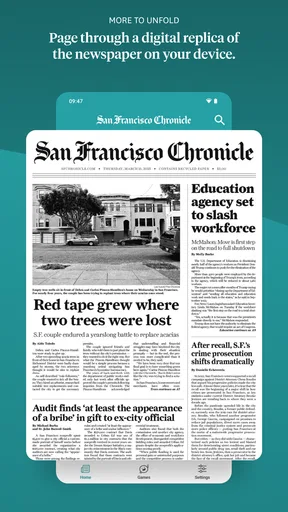
 Analysis by AppCompare
I tend to judge a local news app by whether it helps me understand the place I’m in, rather than simply sending more headlines my way. The San Francisco Chronicle is aimed squarely at readers who want a regular connection to Bay Area news, city life, and San Francisco sports. I’d consider it most useful for residents, commuters, and anyone with personal ties to the region; if you mainly want national or international coverage, a broad news aggregator may suit you better.
What I consider when trusting a local news app
News apps ask for attention at moments when people may be making decisions: before a commute, during a local emergency, or while trying to understand a debate affecting their neighborhood. That makes clarity and user choice important. A familiar newspaper name can be a helpful starting point, but I wouldn’t treat the name alone as proof of how an app handles information or what controls it offers.
The Chronicle app is published by Hearst Newspapers - LLC, and it is free to download. Its overall rating is 4.1 from around 1,600 ratings, which gives a rough sense of how other users have responded, not a guarantee that every reader will have the same experience. The audience rating is Everyone. I’d still make my own decision based on whether the app’s content and any choices shown during use fit my needs.
Check the choices on your own device
Before signing in or changing settings, I’d look at the screens the app actually presents: what it asks permission to do, what account options are available, and whether there are visible controls for notifications or personalization. Those details can affect a news app more than its headline layout. I don’t assume a control exists just because it is common in other apps; I check the current version and the device’s own settings.
If you prefer not to create an account, first see what you can read without one and whether the app clearly explains when a sign-in is needed. If you do make an account, take a moment to review its available preferences rather than accepting every prompt automatically. On Android or iOS, you can also review app permissions through your phone’s settings and switch off access you don’t want to grant, while keeping in mind that doing so may affect a related function.
Moments when privacy and attention matter
Location-based news can feel especially personal. A story about a neighborhood, a commute, or a nearby incident may be useful, but that doesn’t mean I would automatically grant location access. I’d first see whether the app lets me follow a place by choosing it myself. If a permission prompt appears, I’d read what it requests and decide whether the benefit is worth it for my use.
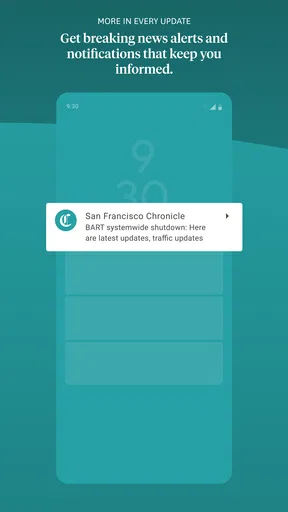
Notifications deserve the same thought. Alerts can be valuable when a developing local story affects plans, but frequent interruptions can make it harder to distinguish urgent news from routine updates. I’d start with notifications off or limited, then enable only the categories I actually want if the app offers those choices. If it doesn’t provide fine-grained controls, the phone’s notification settings are a practical way to reduce interruptions.
Worth Reading Before You Choose

EA SPORTS FC Mobile 26 Is a Bigger Football Game, but It Takes Time

Flipboard Shows What News Apps Must Do Beyond the Feed

Switching to Android Auto Means Rethinking Your Driving Routine

Google Calendar Makes a Crowded Week Easier to Manage

Ludo King Makes the Most of the Minutes Between Plans

Baby Panda World Brings Quick Play to Modern Phones, but Its Game Library Feels Busy
Reading news also involves a data trade-off that is easy to overlook: opening articles, watching video, and browsing while away from Wi-Fi can use mobile data. If you follow a developing story on a commute, I’d keep that in mind before watching video over a limited plan. The app’s news focus may make multimedia appealing, but a text-first approach is often the better choice when data use or battery life matters.
Who will get the most from it
This is a better fit for someone who wants a recurring Bay Area news habit than for someone who checks headlines only occasionally. A resident might use it to keep track of city decisions and events, while a former San Franciscan could use it to stay connected from elsewhere. For a visitor, it may help add local context to a trip, though it shouldn’t replace practical travel tools for transit directions or immediate safety information.
For a realistic weekday routine, I’d scan the main headlines over breakfast, save a longer article for later if that option is available, and check local updates again before heading home. That approach keeps the app in a useful role without turning every alert into an interruption. If I were planning around weather, I’d compare the app’s coverage with a dedicated forecast source when precise, time-sensitive conditions mattered; a newspaper app is not necessarily a substitute for a specialized weather service.
Readers who want one publication’s reporting and perspective may prefer this to an aggregator that mixes stories from many outlets. The trade-off is breadth: an aggregator can make it easier to compare coverage across publishers, while a local newspaper app is more focused on its own region and newsroom. If your priority is a wider national or global overview, I’d pair this app with another source instead of expecting it to cover every topic equally.
Practical trade-offs before settling in
The app’s listed version is 202602.31, and it requires Android 9 or later. It also has in-app purchases ranging from $5.99 to $14.99 per item. Since access and purchase prompts can shape the reading experience, I’d pay attention to what is available before committing to a purchase and check the terms shown in the app. The free download is a low-friction way to see whether the coverage works for you, but it doesn’t mean every piece of content or option is necessarily free.
One useful habit is to decide what you want the app to do before personalizing it. If you only need major city updates, avoid adding every possible interest; a narrower selection can make the feed easier to scan. If you follow a particular subject, check whether the app’s available controls let you bring that topic forward. This is more effective than opening the app repeatedly without a clear purpose, especially when you’re trying to keep news consumption manageable.
Another sensible check is to revisit notification and account choices after using the app for a few days. A setting that seemed useful at first may turn out to be noisy, and a permission you declined may prove unnecessary for the way you read. I prefer making those decisions based on actual use rather than granting broad access up front. If the controls are not as detailed as you want, keeping the app’s permissions and notifications limited is a reasonable compromise.
The San Francisco Chronicle app is free, and it has more than 50,000 installs. It was released on October 23, 2018, and the current version reflects ongoing software updates, but neither age nor install count tells me whether its present-day experience will match every reader’s expectations. I’d use a short trial period to judge the article mix, navigation, and account prompts on my own phone before making it part of a daily routine.
Ultimately, I’d skip it if I wanted a neutral, multi-source dashboard, a dedicated weather tool, or a news app centered on a different region. I’d also be cautious about turning on alerts or permissions simply for convenience. For someone who follows San Francisco and wants local reporting in a single publication’s app, however, it has a clear reason to be on the shortlist.
If you’ve ever been curious about what’s happening in the vibrant city of San Francisco, then the app is probably something you’ve considered downloading. I took it for a spin to see if it lives up to the hype and here’s my take on it.
Getting Started with the App
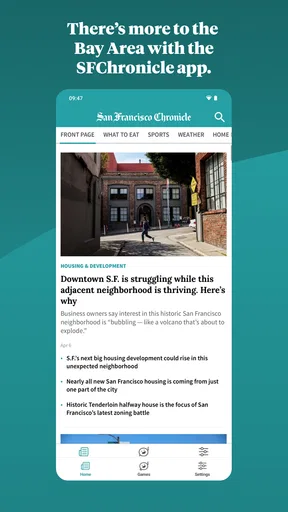
First off, downloading the app was a breeze. It’s available on both Android and iOS, so no matter what device you’re rocking, you’re covered. Once installed, the app greets you with a clean and intuitive interface. There’s something comforting about its straightforward design; it doesn’t overwhelm you with too many options right off the bat.
Setting up was pretty smooth too. You can either create an account or browse as a guest, but I’d recommend signing up for the full experience. Logging in allows you to customize your news feed, which is a neat feature if you want to keep tabs on specific topics or areas within San Francisco.
Exploring the Features
What caught my eye first was the local news coverage. The app does a stellar job of keeping you informed about everything from politics to cultural events. The articles are well-written and provide a good depth of information without being too verbose. It feels like you’re getting the inside scoop directly from the city’s heart.
Next up is the multimedia section, which is pretty impressive. If you’re a visual person like me, you’ll appreciate the high-quality images and videos that accompany the stories. It’s like having a mini-documentary library in your pocket. Plus, the live updates feature is a lifesaver for staying informed on developing stories.
One of my favorite features is the ability to bookmark articles for later. Sometimes, life gets in the way, and you can’t finish an article in one sitting. This feature ensures you can come back to it anytime you want.
Navigation and User Experience
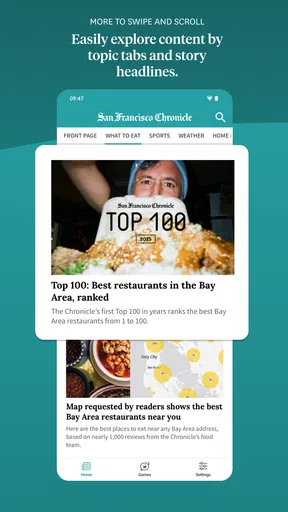
Navigating through the app is as seamless as a late-night stroll through Golden Gate Park. The menu is accessible and neatly categorized, making it easy to find what you’re looking for. Whether it’s the latest headlines, sports updates, or opinion pieces, everything is just a tap away.
The app also offers a personalized news experience. By selecting your interests, you can tailor the content to suit your preferences. It’s like having your personal news editor, curating stories that matter to you.
“In a world overflowing with information, having a reliable source like the app makes all the difference.”
The Verdict
So, is the app worth your time? Absolutely. It’s a solid choice for anyone interested in staying informed about San Francisco. It combines the best of local journalism with the convenience of modern technology. The app’s design is user-friendly, and its features are well thought out, making it a must-have for news enthusiasts.
Overall, the app is a fantastic tool for keeping up with the latest happenings in the city. Its blend of rich content and ease of use makes it stand out in the crowded field of news apps. So, if you’re eager to dive into all things San Francisco, this app should definitely be on your radar.
Pros
- Comprehensive local news coverage.
- User-friendly interface design.
- Customizable news alerts.
- Offline reading available.
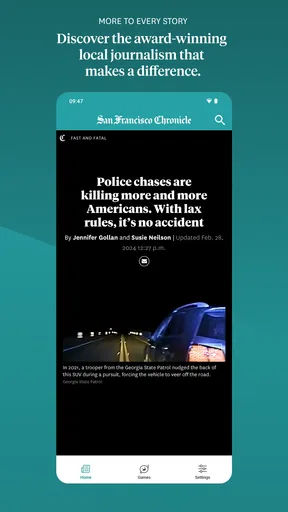
- High-quality investigative journalism.
Cons
- Limited international news focus.
- Occasional ads in free version.
- Subscription required for full access.
- Some articles behind paywall.
- App updates can be infrequent.
FAQs for The San Francisco Chronicle
What features does The San Francisco Chronicle app offer?
The San Francisco Chronicle app provides a comprehensive array of features including breaking news alerts, in-depth articles, interactive multimedia, and customizable notifications. Users can explore local and global news, sports updates, business insights, and lifestyle features. The app also offers offline reading options and access to exclusive subscriber content.
Is The San Francisco Chronicle app free to use?
The app is free to download, allowing users to access a limited amount of content. However, to unlock the full range of articles and premium features, a subscription is required. Pricing details for subscriptions can be found within the app, offering various plans to suit different user needs.
How often is the content updated on The San Francisco Chronicle app?
Content on The San Francisco Chronicle app is updated continuously throughout the day. Users receive real-time news alerts as stories develop, ensuring they are always informed of the latest events. The app's editorial team provides up-to-date coverage, making it a reliable source for current news.
Can I customize the notifications on The San Francisco Chronicle app?
Yes, the app allows users to customize their notification preferences. You can choose to receive alerts on specific news categories such as politics, sports, or entertainment. This personalization ensures that users only get updates that are relevant and interesting to them, enhancing the user experience.
What should I do if I encounter technical issues with The San Francisco Chronicle app?
If you experience any technical difficulties with the app, there is a support section available where you can report issues directly. The app also includes a help guide with troubleshooting tips. For further assistance, users can contact customer support through the app's contact options.


